Resource Planner Blog
Free Resource Planning Google Sheet and xlsx templates
For project managers, resource managers, and CEOs of small-to-mid sized teams, a flexible resource planning template often hits the sweet spot between simplicity and insight.
This article compares the best resource planning templates in may 2026, ranked for their features and suitability. We highlight a free Google Sheets-based template (our top pick) alongside other top templates and tools, and discuss when a dedicated project staffing tool might be needed as teams scale.
What is a resource planning template?
A resource planning template is a pre-formatted document (often a spreadsheet) that helps you map out and schedule all the resources needed for a project. These resources include your team members (human resources), time (hours or days of work), and other assets like equipment or budget.
By using a resource planning template, you can allocate team capacity to projects over a timeline (e.g. day-by-day or week-by-week), visualize workload vs. availability, and ensure no task or team member is overlooked. In short, it's a blueprint for team planning and capacity allocation – helping project managers assign the right people to the right tasks at the right time. A good template will also facilitate tracking resource utilization (how fully each person is booked) and flagging over-allocations before they become a problem.
What is the best way to allocate team capacity?
As your organization grows, the best way to allocate team capacity may involve moving to a dedicated resource management software or if you are more shift oriented business type, using shift scheduling tool that can automatically handle availability updates, skill matching, and real-time conflict alerts. But for small and mid-sized teams, a solid resource planning template can be efficient starting point.
1. Free Google Sheets Resource Planning Template (Top Pick)
Format: Google Sheets (Excel-compatible) – Best for small to mid-sized teams looking for a quick, customizable solution without new software. Our top-ranked option is a free Google Sheets resource planner template that offers a surprisingly robust toolkit for capacity planning.
It's essentially a mini resource management system built in a spreadsheet, which makes it ideal for teams that want something more powerful than a blank Excel sheet but aren't ready to invest in complex software. This template was designed with day-by-day resource allocation in mind, making it easy to schedule your team's work on a daily basis across multiple projects.
Key Features and Benefits:
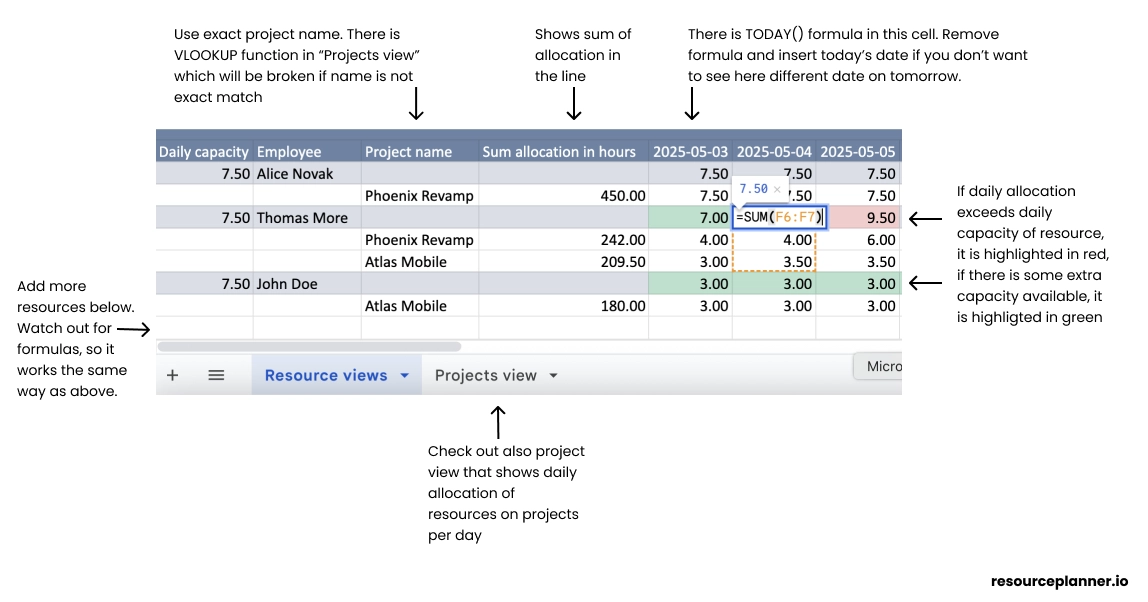
- Colour-coded workload vs. capacity
Conditional formatting turns cells green when the allocation is below capacity and red when it exceeds it—so issues surface instantly. - Daily project-wise allocation tab
Aggregates hours per project per day, offering a ready-made dashboard for status meetings. - Works in Google Sheets
Real-time collaboration lets distributed teams update plans simultaneously. - Excel compatible
Keeps finance or legacy PMO teams in sync with your cloud file. - No macros required
Plain formulas mean easy customisation and zero security warnings.
This free template effectively covers the basics of resource capacity planning – you can see who is doing what on each day, and whether anyone is over capacity. It's especially useful for organizations where project planning is done on a day-by-day basis and where keeping things lean and simple is a priority. By using a familiar spreadsheet interface, it minimizes the learning curve and lets you focus on optimizing your allocations rather than learning a new tool.
👉 Resource planner 2026 Google Sheet template or check out this resource planning tool (Start for free).
Feel free to adapt colours, add KPIs, or embed the sheet into your PMIS. If you outgrow spreadsheets, explore dedicated tools like the ones benchmarked in our 2026 resource-planning software roundup.
2. ProjectManager.com Resource Plan Template (Excel)
Format: Excel spreadsheet – Best for project managers who want a comprehensive resource planning sheet with cost tracking, provided by a trusted PM software vendor.
ProjectManager.com offers a popular resource plan template for Excel as a free download. It's a one-stop template to document all your project's resources and schedule. Unlike a basic spreadsheet, this template comes pre-built with sections and formulas to help prevent common resource planning headaches. It's ideal if you need to integrate resource planning with budget calculations or if you simply prefer Excel.
Key Features and Benefits:
- All-in-One Resource Listing: The template provides a structured table to list each resource (which can be individual team members, equipment, or materials), along with details like their role or category, availability, and cost rate. This acts as a master resource roster for your project.
- Task & Timeline Integration: For each resource, you can allocate their effort across a project timeline (often in weekly increments or project phases). The template includes a built-in calendar view or sections for weeks/months, so you can map out who is needed when. This helps ensure you have the right resource at the right time and spot any periods where resources are overbooked or sitting idle.
- Automatic Effort & Cost Calculation: One standout feature is that it can calculate total effort hours and associated costs automatically. For example, as you assign hours to a resource for each week, the template sums up the hours and multiplies by that resource's hourly rate (if provided) to tally the cost. This is great for budget-conscious planning – you'll see the projected labor cost per resource and overall.
- Bottleneck and Shortage Warnings: By having all resources and their allocations in one place, it becomes easier to identify bottlenecks. If two critical tasks overlap in the same week but you only have one specialist resource available, the template structure makes that conflict visible so you can address it (either by shifting schedules or bringing in additional help).
Because this template comes from a well-known project management platform, it's designed to be a stepping stone into more advanced tools. It's perfect for ensuring nothing falls through the cracks in planning – you account for every person and item needed. However, note that as an Excel file it's not real-time collaborative (you'll need to share updates manually), and you might have to enable editing or tweak settings due to Excel's security prompts. For a single project or a smaller team, though, it provides rigor and clarity without requiring a full software signup.
👉 Download the ProjectManager.com xlsx resource plan template
3. Build your own very easily in Google sheets in 3 minutes
I understand that you are looking for pre-build template. But you can easily build your own in 3 minutes... just have a look in this video.
Conclusion
Our #1 pick, the Google Sheets template, is a great starting point if you're looking to balance workloads and visualize allocations with minimal hassle. On the other hand, Excel isn't project management software and we highly recommend giving your team the tools they need. Dedicated resource planning solution like ResourcePlanner.io or others in the market can save you time and provide advanced features like real-time updates and detailed reports. For a broader look at software options, check out our 2026 Resource-Planning Software Roundup where we review premium tools and offer guidance on when to make that leap.
No matter which option you choose, the goal remains the same: achieve clear visibility into your team's workload and capacity. With the right template or tool in hand, you'll allocate resources more effectively, prevent burnout or underutilization, and confidently forecast your team's workload. Happy planning!