Resource Planner Blog
New features! ResourcePlanner evolves again.
Resource Planner keeps evolving to make scheduling simpler, smarter, and more tailored to your team’s needs. Hot on the heels of our first batch of upgrades, we’re excited to introduce another set of improvements that streamline your workflow and enhance how you manage projects, resources, finances and time off.
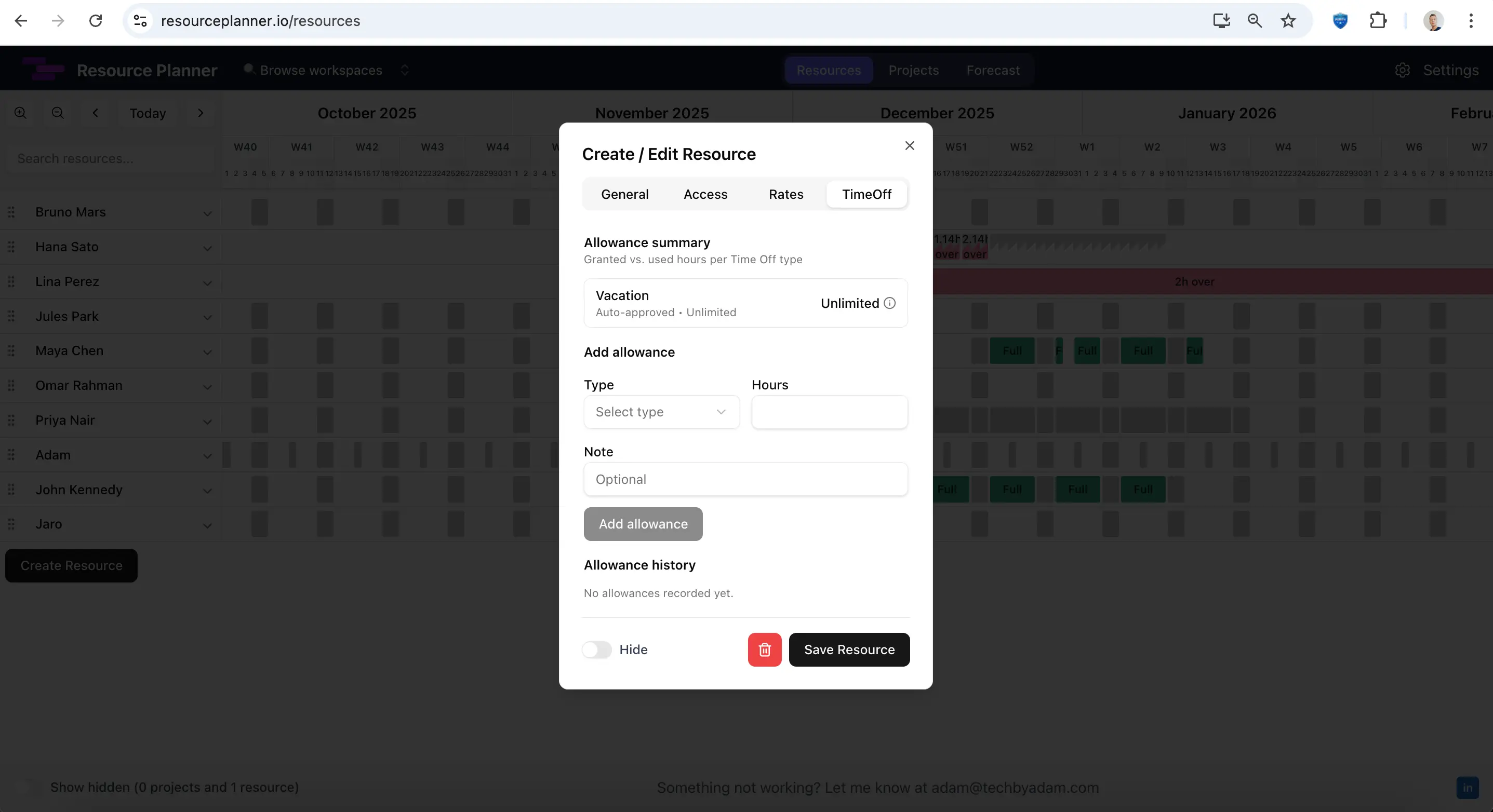
Time‑Off Types and Requests
One of the biggest additions in this release is full time‑off management. Administrators can create different Time‑Off types — for example, vacation days, sick leave, or training. Each type can have its own annual allowance. Members can submit time‑off requests, and their manager or an admin approves them.
Unified view: See vacations, sick days and other absences alongside project allocations. No more juggling between your scheduling tool and a separate leave tracker.
Automated allowances: Track how much time off each person has used and how much remains. Resource Planner helps prevent overbooking and ensures policy compliance.
Simple approvals: Managers receive requests and can approve or decline them directly within the tool. Everyone stays informed, and calendars update automatically.
This feature turns Resource Planner into a viable alternative to dedicated absence management tools like Timetastic, while keeping all resource planning in one place. If you want to see this kind of workflow in practice, our guide to resource planning for small law firms covers the operational side in more detail.
Hide Projects or Resources
Does your schedule include archived projects or seasonal contractors that you don’t need to see every day? With the new hide feature, you can temporarily remove projects or resources from view while keeping their data intact. Hidden items can be unhidden at any time.
Focus on what’s relevant: Keep your planning grid uncluttered by removing completed or dormant projects from view.
Maintain history: Hidden projects and resources stay in the database, preserving assignments and reports for future reference.
Improved Horizontal Scroll
Did you notice untintentional horizontal scrolls? We did. We’ve refined the horizontal scrolling behaviour so you only move sideways when you intend to. Smoother scroll bars and touch‑pad handling help you navigate large timelines without accidental jumps. Combined with the ability to reorder rows, the enhanced scroll makes large schedules easier to explore.
Rates per Project (and per Resource)
We received feedback from one of you - one of our customers. Originally, bill rate was defined per resource but we realized that this is not ideal. In most organisations, the hourly rate you charge depends on the project. We’ve moved rate settings from the resource profile to the project itself. Set a default rate for each project, and optionally override it for specific resources. For example, your designer might bill differently than your developer on the same job.
Better cost tracking: Associate rates directly with revenue‑generating projects instead of static team members.
Flexible pricing: Set custom rates for premium roles or discounted clients without creating duplicate resource profiles. This becomes especially useful once you start doing structured revenue forecasting.
Project Size and Milestones
To keep budgets under control, you need to know how many hours a project should consume — and how many you’ve already planned. The new project size setting lets you enter the total expected allocation for each project. Resource Planner then shows how many hours have been scheduled and how many remain to be planned.
Also, we added a simple indicator of milestones. This helps project managers keep an eye of milestones agreed with customer, balance capacity and forecast resource shortages before they become a problem. It also aligns with what we saw in our deadline research: milestones are only useful when they stay tied to real capacity.
Need Something Else? Let’s Talk
These updates are part of an ongoing roadmap to make Resource Planner to be the best choice in team capacity planning tools. If there’s a feature you’re missing or a workflow you’d like to automate, we’re happy to help. Email us at adam@resourceplanner.io to discuss customisations, integrations or improvements. Your feedback drives our development, and we love turning your ideas into reality.